
Why Regular Website Updates Matter for Your Business
For many business owners, a website is something you build once and then forget about. As long as it looks good and “works,” it feels safe to leave it alone.
Unfortunately, that mindset is exactly what puts many business websites at risk.
If your website runs on WordPress (as millions do), regular updates are not optional; they are essential. Updates protect your site from security threats, keep it fast and stable, improve search engine visibility, and ensure compatibility with modern browsers and devices.
In this article, we’ll explain why regular website updates matter, what can happen if you ignore them, and how staying up to date helps your business succeed long term.
1. Security: The #1 Reason Updates Matter
Security is the most important reason to keep your website updated.
WordPress itself is secure, but vulnerabilities usually come from:
- Outdated themes
- Outdated plugins
- Old versions of WordPress core
When developers discover a security issue, they release an update to fix it. If that update is not installed, the vulnerability remains open, and attackers actively look for websites running outdated versions.
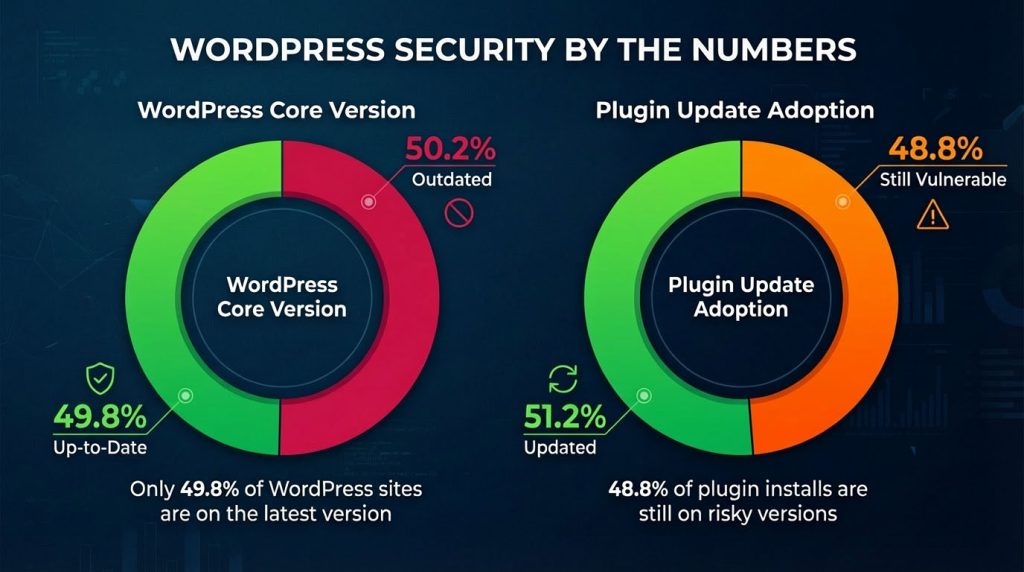
Security research shows that many hacked WordPress websites were running outdated themes or plugins that had not been updated for months.
Hackers rarely target individual businesses manually. Instead, they use automated bots that scan thousands of websites for known vulnerabilities. If your site matches one of them, it becomes an easy target.
What can happen if your site is compromised?
- Your website may be taken offline
- Malware or spam links can be injected
- Google may flag your site as unsafe
- Customer trust can be permanently damaged
For a business website, this often means lost leads, lost sales, and a damaged reputation. Regular updates significantly reduce this risk.
2. Performance: Faster Websites Convert Better
Website performance is directly tied to business results.
A slow website:
- Increases bounce rates
- Reduces conversion rates
- Frustrates users
- Hurts search engine rankings
Theme and plugin updates don’t only fix bugs, they often include performance improvements such as:
- Cleaner, more efficient code
- Better compatibility with caching systems
- Faster loading times
- Reduced resource usage
Modern WordPress themes and plugins are continuously optimized to work better with new PHP versions, updated hosting environments, and modern browsers. If your site runs outdated code, it may miss out on these improvements.
Keeping your website updated helps it load faster, feel smoother, and perform better for real users.
Choosing a well-maintained theme with regular updates, like our Constructo WordPress theme, helps ensure long-term performance, stability, and compatibility.
3. SEO: Updates Help You Stay Visible on Google
Search engines care deeply about:
- Website speed
- Mobile usability
- Security and trust signals
- Overall user experience
Many updates directly or indirectly affect SEO.
For example:
- Theme updates improve mobile responsiveness
- Plugin updates improve page speed and stability
- Security updates prevent Google blacklisting
- Compatibility updates prevent broken layouts and errors
An outdated website can slowly lose rankings without any obvious warning signs. Meanwhile, a well-maintained site sends positive signals to search engines and is more likely to stay competitive in search results.
For businesses that rely on organic traffic, updates are a long-term SEO investment, not just a technical task.
4. Compatibility: Prevent Sudden Website Breakdowns
One of the most frustrating situations for business owners is when a website suddenly breaks after working perfectly for years.
This often happens because:
- Hosting providers upgrade PHP versions
- Browsers change how they render content
- WordPress introduces new standards
Outdated themes and plugins may not be compatible with these changes, leading to:
- Broken layouts
- Features that stop working
- Admin areas you can’t access
- White screens or error messages
Regular updates prevent these issues by ensuring all parts of your website evolve together.
Think of it like maintaining a car: small, regular services prevent expensive breakdowns later.
5. New Features and Better Usability
Updates aren’t just about fixing problems; they also improve how your website works.
Theme updates often introduce:
- Better design options
- Improved user experience
- New layout elements
- Cleaner admin controls
Plugin updates may add:
- New integrations
- Improved dashboards
- Better automation and workflows
By staying updated, you’re not only protecting your website, you’re actively improving it. This is especially important for businesses that want their online presence to grow alongside their services.
6. The Hidden Cost of Ignoring Updates
Some businesses avoid updates because they fear something might break.
Ironically, not updating is usually the bigger risk.
Ignoring updates can lead to:
- Emergency repair costs
- Unexpected downtime
- Expensive cleanup after a security incident
- Forced rebuilds instead of simple fixes
Preventive maintenance is always cheaper, safer, and less stressful than recovery.
6.5. Real-World Example: When Updates Are Ignored
Many website problems don’t start dramatically; they start quietly.
A typical scenario looks like this:
- A website hasn’t been updated in months
- One outdated plugin contains a known vulnerability
- An automated bot exploits it
- The site becomes infected with spam links or malicious code
The business owner may not notice immediately. Traffic slowly drops, contact forms stop working, or customers report strange browser warnings.
By the time the issue is discovered, fixing it often requires:
- Cleaning infected files
- Restoring backups
- Rebuilding parts of the website
- Paying for emergency support
All of this could have been avoided with regular updates that take just a few minutes each month.
7. How Often Should a Website Be Updated?
For most WordPress business websites, a safe guideline is:
- WordPress core: update when stable versions are released
- Themes and plugins: every few weeks or immediately for security fixes
- Routine checks: at least once per month
If you’re not comfortable handling updates yourself, working with a reliable theme provider or support team can make a big difference.
7.5. Why Backups and Updates Go Hand in Hand
Updates should always be paired with proper backups.
A backup is your safety net; if anything goes wrong, you can quickly restore your website to a working version.
Best practices include:
- Automated daily or weekly backups
- Storing backups off-site
- Keeping multiple restore points, not just one
When backups and updates work together, updates become low-risk instead of stressful. This is why professional themes and managed setups always emphasize both.
8. How We Approach Updates at AnpsThemes
At AnpsThemes, we believe a WordPress theme is not a one-time product; it’s a long-term foundation for your business.
That’s why our themes come with:
- Free theme updates
- Ongoing compatibility improvements
- Security-conscious development
- Reliable and responsive support
Our goal is not just to sell a theme, but to help businesses run stable, secure, and future-proof websites.
If you ever have questions about updates, compatibility, or best practices, our support team is here to help.
For businesses that prefer a hands-off approach, we also offer tailored website support and maintenance solutions on a monthly basis. If you’re looking for long-term peace of mind and personalized assistance, feel free to reach out to us to discuss the best option for your setup.
Final Thoughts
Your website is not just a design, it’s a living system that needs ongoing care.
Regular updates protect your business from security threats, keep your site fast and search-engine friendly, and ensure everything continues working as technology evolves. Ignoring updates may seem harmless in the short term, but over time it increases risk, costs, and stress.
Whether you manage updates yourself or rely on a trusted theme provider and support team, staying up to date is one of the simplest and smartest ways to protect your online investment and support long-term business success.